Halow Plus: Fast live football scores with Kurdish support
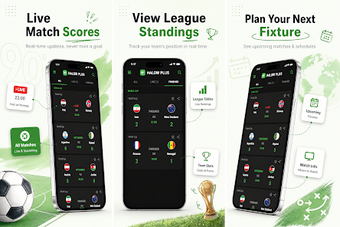
Halow Plus, developed by Halw kareem, is a mobile sports app that delivers instant football match information for daily followers. The app presents real-time scores, fixtures, and league tables on a compact dashboard, prioritizing quick updates and low resource use for constrained mobile devices. Key tools include team tracking, historical results access, and Kurdish language support, which aim to help Kurdish-speaking fans and casual viewers keep up with matches during the day.
Works across phones and TV boxes for flexible viewing
The app is available on Android and iOS, and it extends to Android TV and Android Box hardware, which lets users shift match viewing from handheld devices to living-room screens. Installation uses mainstream stores, and the developer keeps platform parity so core match data appears across mobile and TV interfaces during match days. That setup reduces friction for moving from score checks on the go to group viewing at home.
- Android phones
- iOS devices
- Android TV and Box
Provides seasonal context with standings and past results
The app lists league standings alongside past match results, making short checks more informative when deciding whether a match matters in a season race. Historical scores and tables are accessible from match pages, which helps users scan form and rankings without opening multiple screens. This focus on contextual data supports quick comparisons between teams and can shorten pregame browsing before kickoff.
Local language support reduces navigation friction for Kurdish users
Recent updates include Kurdish language localization and improved translations, which lower the language barrier for local fans and reduce navigation errors. The interface keeps options minimal and text concise so that non-technical users find scores and archive results quickly. The developer's stated focus on the Kurdish-speaking community aligns with these choices, helping users adopt the app with fewer language-related hurdles.
Community channels add entertainment features but introduce extra steps
Community interaction plays a visible role in the app's extended capabilities. The developer maintains active social media engagement, and several entertainment features are enabled through community-shared activation methods rather than appearing by default in the store build. That approach gives power users ways to expand the app, while casual fans may encounter extra steps to access non-sports functions and rely on social channels for setup tips.
To sum up, a compact match companion for local football fans
The app is a practical choice for fans who need quick match references during the day and accept occasional setup steps for extra content. It fits people comfortable using community channels for tips, less so for those wanting every feature active immediately. Pro tip: follow the developer's social media to find community-shared activation methods and usage tips that unlock extended entertainment functions.